The Nervous System of Your Boat
If your boat has more than two electronic devices on it, you need to understand NMEA 2000. It's not the most exciting topic in marine electronics, but it's one of the most important. NMEA 2000 is the network protocol that lets your chartplotter, autopilot, engine sensors, VHF radio, depth sounder, and dozens of other devices talk to each other. Without it, every device on your boat is an island. With it, they work together as a system.
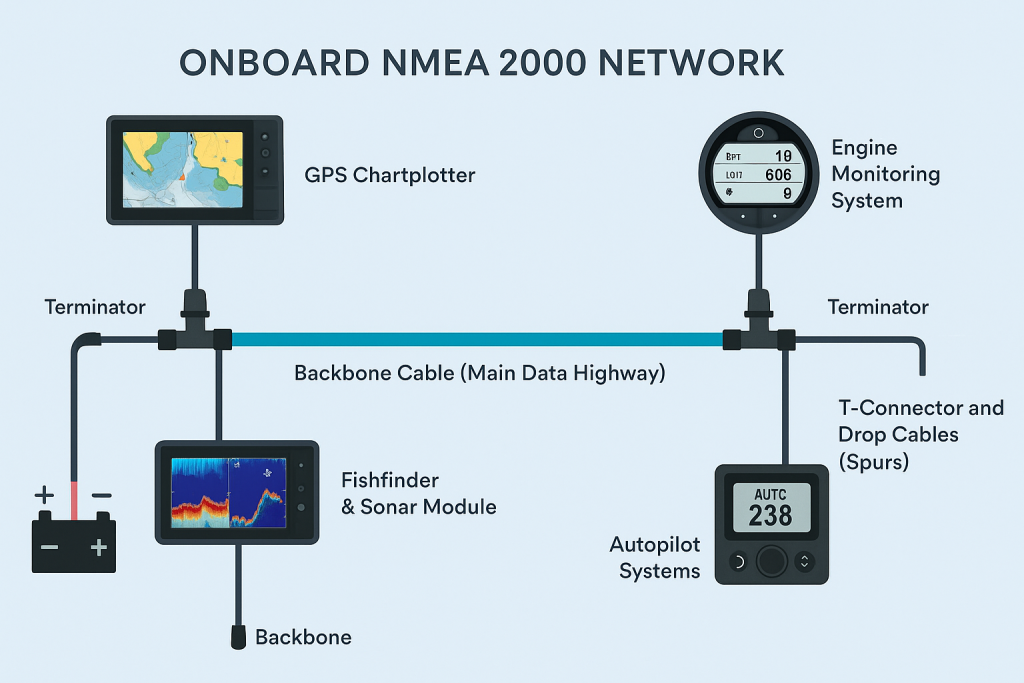
Think of it as the nervous system of your vessel. The backbone is the spinal cord, the T-connectors are the junctions, and each device is a nerve ending sending and receiving information. When it's installed correctly, everything just works. When it's installed poorly, you get intermittent data dropouts, phantom alarms, and devices that mysteriously stop communicating.
What NMEA 2000 Actually Does
NMEA 2000 is a CAN (Controller Area Network) protocol, originally developed for the automotive industry and adapted for marine use. It allows multiple devices from different manufacturers to share data on a single network cable. Your GPS sends position data. Your depth sounder sends water depth. Your engine sends RPM, temperature, and fuel flow. Your autopilot receives course data. All of this happens simultaneously on the same network.
Before NMEA 2000, connecting devices meant running individual cables between each pair of devices that needed to communicate. Three devices meant three cables. Ten devices meant a rat's nest of wiring. NMEA 2000 replaced all of that with a single backbone that every device taps into.
The Backbone: How It Works
The backbone is the main trunk cable that runs the length of your network. Every device connects to the backbone via a T-connector, and drop cables run from each T-connector to the individual device. The backbone must be terminated at both ends with a 120-ohm terminator resistor. Without proper termination, the network won't function correctly. You'll get data errors, dropped messages, and devices that randomly go offline.
There are a few hard rules for NMEA 2000 network construction. The backbone must be less than 100 meters in total length. The maximum single drop cable length is 6 meters. The network needs a power source, typically connected at the middle of the backbone to ensure even voltage distribution. And there can only be two terminators, one at each physical end of the backbone.
Why a Clean Installation Matters
The difference between a good NMEA 2000 installation and a bad one isn't about the devices. It's about the network. We've seen boats where the backbone was daisy-chained instead of properly terminated, where drop cables exceeded the 6-meter limit, where power was connected at one end instead of the middle. These boats had devices that worked most of the time but would randomly drop out, especially when more devices were active.
A clean installation starts with a network diagram. Before running a single cable, you should map out every device, its location, its power consumption (measured in Load Equivalency Numbers, or LENs), and its distance from the backbone. This isn't busywork. It's how you ensure the network will actually work before you start pulling cable.
Common Mistakes to Avoid
Improper Termination
The backbone needs exactly two 120-ohm terminators, one at each end. Missing terminators, extra terminators, or terminators in the middle of the network will cause data errors.
Power at the Wrong Spot
Power should be connected near the middle of the backbone, not at one end. Connecting at the end causes voltage drop that can cause devices far from the power source to malfunction.
Drop Cables Too Long
No single drop cable should exceed 6 meters. If a device is farther from the backbone than that, you need to extend the backbone, not the drop.
Mixing Cable Types
NMEA 2000 uses specific cable with a defined impedance. Using the wrong cable (or mixing brands with different specs) can cause signal reflection and data errors.
NMEA 2000 vs NMEA 0183
NMEA 0183 is the older standard, and it's still used on some legacy equipment. It's a serial protocol that sends data one-way from a talker to a listener. If you want two devices to communicate bidirectionally, you need two separate connections. It's slow, limited, and a pain to wire.
NMEA 2000 replaced all of that with a high-speed, multi-master network where any device can send and receive data on the same bus. If you're installing new equipment, everything should be on NMEA 2000. If you have older NMEA 0183 devices, gateway devices can bridge them onto your NMEA 2000 network.
The Bottom Line
NMEA 2000 isn't glamorous, but it's the foundation that makes modern marine electronics work. A clean, properly installed backbone will give you years of trouble-free operation. A sloppy installation will haunt you with intermittent problems that are nearly impossible to diagnose.
If you're adding new electronics, upgrading your helm, or experiencing mysterious data dropouts on your existing network, give us a call. We'll take a look at your NMEA 2000 installation and make sure it's built right.
Questions about your vessel's electronics?
Our team is on the dock and ready to help. Call us or schedule a free vessel consultation today.